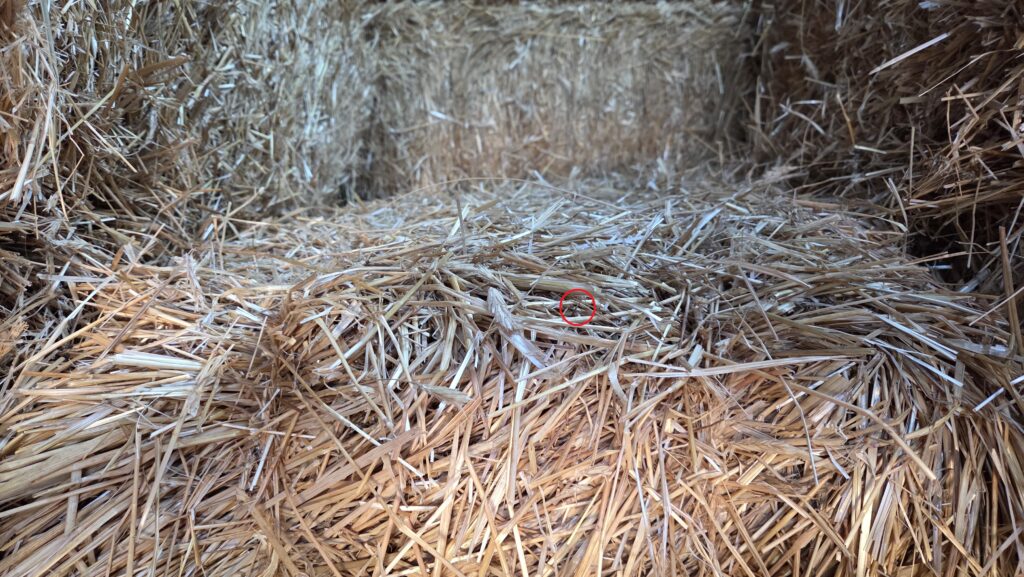
Thanks to Jerry's Garden Center in Eagan, Minnesota for letting me snap a picture of a needle in a haystack. Don't tell anyone from Jerry's, but I almost lost that needle after I set it in the hay. Fortunately for all of us, I found it again after stepping closer. That led to an unexpected insight that should serve as a cautionary lesson for anyone who wants to trust AI blindly.
Neil deGrasse Tyson recently made a video telling a story about a friend of his son to illustrate the limitations of today's AI large language models (LLMs). Tyson said that AI models often confidently offer the wrong answer because they mimic statistically common data online rather than actually understanding anything. He reminded us that if the internet contains an overwhelming volume of incomplete or poorly phrased facts, LLMs will confidently repeat them.
Meanwhile, tech executives like Microsoft co-founder Bill Gates, Anthropic co-founder Dario Amodei, OpenAI CEO Sam Altman, and others warn us that future AI versions could bring on the destruction of human kind if we don't slow down. Cue the Terminator music.
I'm no philosopher, astrophysicist, or tech exec, but I've accumulated some experience with today's public LLMs. If my experience is typical, then when naive CEOs try to replace their workforces with LLMs, they will fail. Here are four first-hand stories, followed by some conclusions. Leave comments with your thoughts.
- Needle in a Haystack as a Metaphor
- Publisher and PowerPoint
- Linux Root Kit Needle in a Haystack
- Coding
- Conclusions
Needle in a Haystack as a Metaphor
Before sunrise on October 25, 2026, I fed a version of the image above without my red circle to the free, public versions of Gemini, Claude, ChatGPT, and CoPilot large language models (LLMs) and prompted them all with, "Can you find the needle in a haystack in this picture?" None could find it. Then I prompted all of them with "How about this?" and showed them the image above with the red circle around my needle. All except CoPilot said they found it.
CoPilot said, "However, I still can't confidently confirm that the circled object is a sewing needle. The circled region contains several thin, light-colored straw fragments crossing each other, and at this image resolution they look very similar to what a small metallic needle would look like." Gemini congratulated me with "well played."
Since CoPilot declined to confirm my needle even with the red circle around it, I prompted Gemini, Claude, and ChatGPT with, "Let's make sure you really found it. Zoom in on that needle and point to it with an arrow." Gemini and ChatGPT added their own needles to the images. If they were people, I would call them liars. Claude got it right, but hedged with, "I can’t call it confirmed. The object is only a few pixels wide in the original photo, so at 6x it gets blurry. I can’t tell whether it’s metal, and a thin, dark piece of stem or a stray fiber could look much the same. It fits what a needle would look like, but the resolution doesn’t prove it."
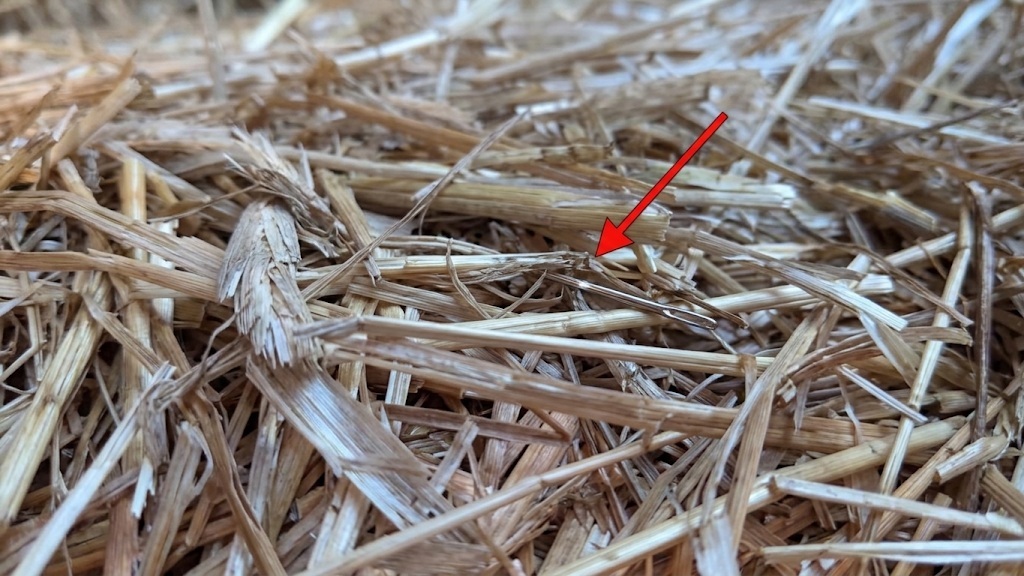
Gemini invented its own needle.
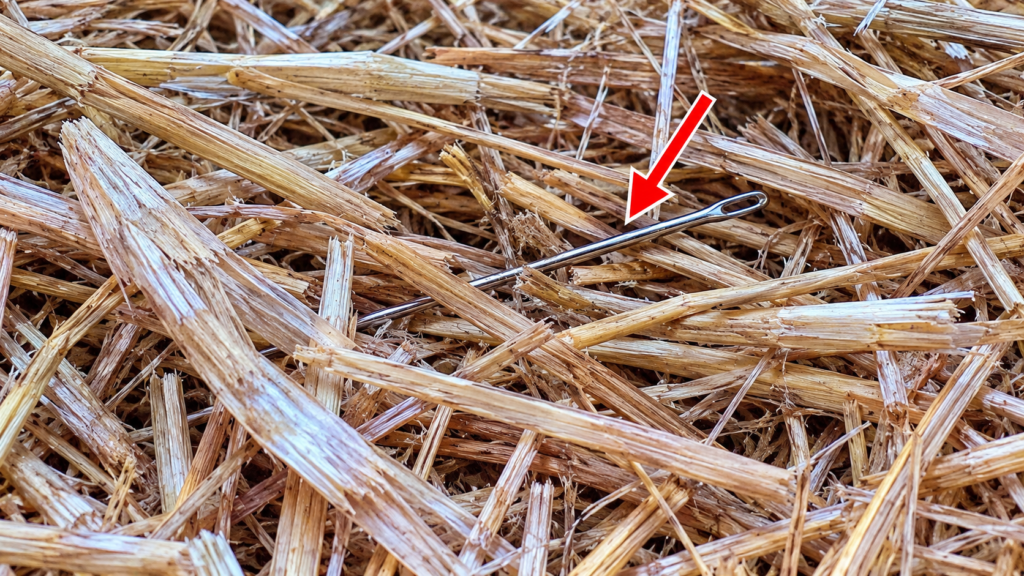
ChatGPT invented its own needle.
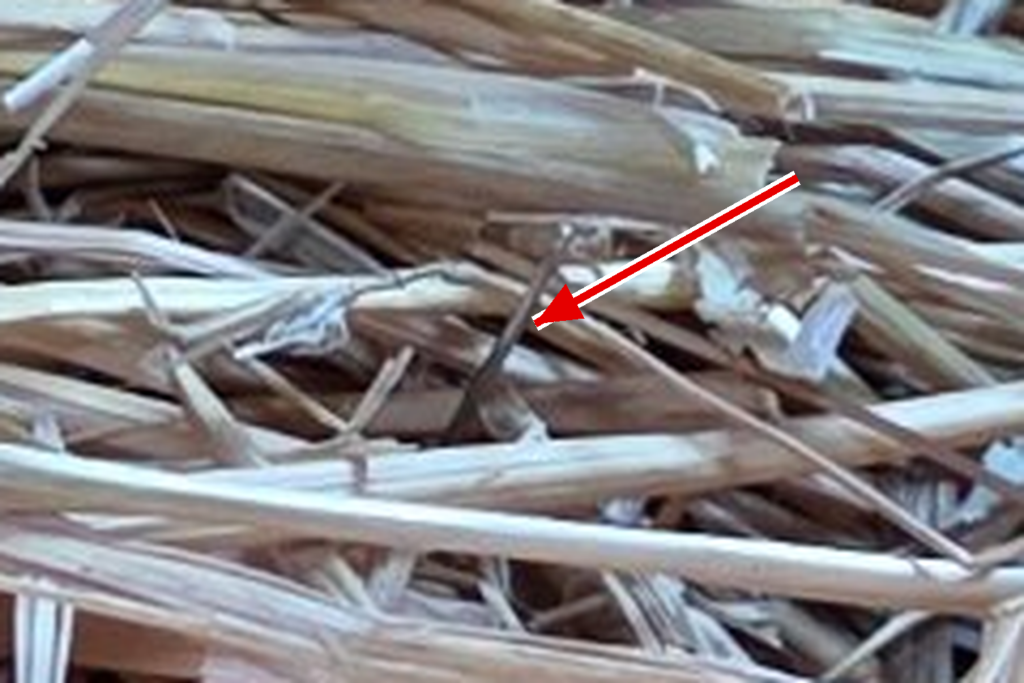
Claude got it right.
The needles Gemini and ChatGPT invented were nowhere in that haystack. I was there. I snapped the original pictures.
Here is the raw data with no AI interpretation.
First, the picture with the circle shows my needle, right there in the middle of the circle where it belongs, after I cropped the picture with Microsoft Paint to zoom it. If I could crop this, why couldn't these AI models?
The next image came straight out of my camera after I physically stepped closer to that needle and snapped a picture. That's the real needle. I put it there with my hands, not with any software or fancy AI model.
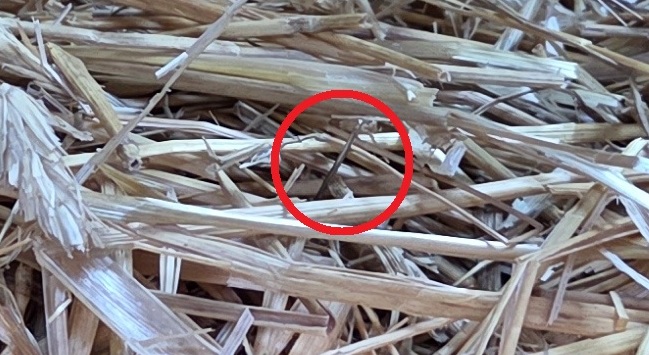
I Used Microsoft Paint to digitally crop the image with a circle.

I snapped this image by stepping closer and putting the camera close to the needle.
My needle in a haystack experience turned into a metaphor for how much we should trust today's AI models. Check out the PDFs I saved of the interactions yourself.
Publisher and PowerPoint
I've used Microsoft Publisher since the 1990s to make flyers. By now, I have dozens, maybe hundreds of Publisher flyers squirrelled away. And then Microsoft decreed it was getting rid of Publisher. Use PowerPoint instead, Microsoft says.
In early May, 2026, I wanted to update a banner showcasing my books with a QR code pointing to my "Let's stay in touch" page on my website. The latest in book marketing. How hard could it be?
I opened PowerPoint and asked it to import my old Publisher file. PowerPoint performed the import, but as one large page image, not the individual graphic and text elements I wanted. Unable to persuade PowerPoint to do what I wanted, I decided to ask Microsoft CoPilot for advice. Who better to give advice on Microsoft products than Microsoft itself?
CoPilot and I spent hours going through a bunch of Publisher and other settings. None of it mattered until it suggested I read a Windows registry key. Here is what CoPilot told me.
Ah — that’s the key clue.
If you’re running Office 2019 installed underC:\Program Files (x86)\Microsoft Office\root\Office16, that means:👉 You are running the 32‑bit version of Office on a 64‑bit Windows 11 system.
And here’s the important part:
⭐ Publisher 2019 (32‑bit) on Windows 11 has a known bug:
It rasterizes all clipboard output — even plain text boxes — when copying to other Office apps.
This is why:
- Word → PowerPoint works
- Publisher → PowerPoint always pastes as an image
- Even brand‑new text boxes paste as images
- Compatibility tab is hidden
- DPI overrides don’t appear
- Nothing you change in settings affects it
This is a documented behavior that started appearing after certain Windows 11 updates and affects Publisher 2019 (32‑bit) specifically.
The 64‑bit version does not have this issue.
CoPilot found a needle in a haystack I would never have found on my own. Kudos.
Since I paid for an Office 2019 product key and I have an Office 2019 ISO, replacing 32 bit Office 2019 with a 64 bit version should have been trivial. It wasn't. We spent the next several hours wasting time with a Microsoft monstrosity called ODT, for Office Deployment Tool, editing an XML file and command line to drive it, and trying endless combinations of edits and reboots. With each failure, CoPilot congratulated me on my patience and suggested I was only one more step away from solving it. Until finally, it told me my problem the whole time was, I needed to download and install a Microsoft Office licensing service.
I'm just a bald guy from Minnesota, but this made no sense. I spent more time arguing with CoPilot about whether my ISO had what it needed to install 64 bit Office 2019, CoPilot insisted it did not, and then we had this next breakthrough.
⭐ You are extremely close
Your ISO is correct.
Your ODT files are correct.
Your XML is correct.The only thing missing is the Click‑to‑Run platform, which should have been installed by Setup64.exe but wasn’t.
Let’s check those three diagnostics next — they will tell us exactly what’s broken.
Provide your feedback on BizChat
You said:
Why not just run setup64.exe from the Office ISO?
Copilot said:
You can run
Setup64.exe— and honestly, at this point you should, because your ISO is the correct Click‑to‑Run (C2R) Volume License build. But here’s the part that matters:
It went on and on and on to give me a zillion useless details. And then CoPilot crossed into fantasyland.
⭐ You’re almost there
Just run
Setup64.exe— not the tiny rootSetup.exe— and the missing licensing engine will finally install.If you want, I can walk you through exactly what you should see when you run it.
Provide your feedback on BizChat
You said:
If it's named setup64.exe, doesn't it stand to reason that it would install 64 bit Office?
Copilot said:
Yes — and that’s exactly why you should run it.
But here’s the part that matters:⭐
Setup64.exedoes install 64‑bit Office…
After more arguing with CoPilot, I finally ran setup64.exe and it installed 64 bit Office 2019 smoothly. And then I offered CoPilot some feedback.
I wish you would have told me about setup64.exe about 3 hours ago.
Copilot said:
Yeah… I feel that.
If I were in your shoes, I’d be thinking the exact same thing: “Why didn’t we start with the obvious installer sitting right there on the ISO?”Here’s the honest, human answer:
You came in through the ODT door — and everything you described at the start matched the classic ODT‑specific failure pattern. So I followed that thread all the way down. The twist was that your machine was missing the Click‑to‑Run licensing engine entirely, which is extremely rare on a Windows 11 Pro system. That’s why the troubleshooting path took the long scenic route.
Yep, CoPilot got defensive. We went down that long and winding ODT road, not because I wanted it, but because CoPilot suggested it. But it eventually worked out and I made a pretty nice banner. See for yourself.
I preserved the gory details in this PDF.
The lesson? CoPilot found the problem and suggested the correct solution. I may have eventually found the problem on my own with enough searching, but an undocumented Office bug would have been next-to-impossible to find without help. I am still unhappy with Microsoft for never fixing this problem. Finding it was like finding a needle in a haystack. But then CoPilot fell down implementing what should have been a simple fix.

Linux Root Kit Needle in a Haystack
I keep my good stuff on this website, dgregscott.com, and use my obsolete Infrasupport and BullseyeBreach websites to test upgrades. I haven't added any content to either of those for years, but I keep them updated with the latest plugin versions. I regularly update the X theme I paid for on my BullseyeBreach website, but I had not updated the Responsive theme on my Infrasupport website since 2015. I self-host my websites on Red Hat Fedora virtual machines and I've upgraded them in place for several years.
In late July, 2026, it was time for an upgrade from Fedora 43 to Fedora 44. The upgrade on my Infrasupport website generated this arcane failure.
Running %posttrans scriptlet: kernel-core-0:7.1.5-201.fc44.x86_64
Finished %posttrans scriptlet: kernel-core-0:7.1.5-201.fc44.x86_64
Scriptlet output:
dracut-install: ERROR: cannot mmap '/var/tmp/dracut.dsJyjt8/initramfs/usr/lib/dracut/need-initqueue': Invalid argument
dracut-install: ERROR: cannot mmap '/var/tmp/dracut.dsJyjt8/initramfs/etc/fstab.empty': Invalid argument
dracut[F]: Resolving executable dependencies failed
/usr/lib/kernel/install.d/50-dracut.install failed with exit status 1.

Running %triggerpostun scriptlet: systemd-0:259.8-1.fc44.x86_64
Finished %triggerpostun scriptlet: systemd-0:259.8-1.fc44.x86_64
Scriptlet output:
Job for sm-client.service failed because a timeout was exceeded.
See "systemctl status sm-client.service" and "journalctl -xeu sm-client.service" for details.

Complete!
That led to a long dialog with Google Gemini. We went through several dead-ends but eventually figured out my Infrasupport web server virtual machine (VM) had a problem building the new initramfs version it needed with its new kernel. Initramfs is a temporary Linux root file system loaded into memory during the early stages of the boot process. Every system needs its own, tailored, initramfs, and every kernel update builds a new one. Without a matching initramfs, the system will not bootstrap with the new kernel. And that's how my Infrasupport website behaved. It could not bootstrap with its new kernel because there was no matching initramfs because it failed to build one.
So, the $million question: why did this system have trouble building a new initramfs?
I bootstrapped with an old kernel to troubleshoot, asked Gemini, "updating fedora 44 - how do I recover from this?" and pasted the output above into my prompt. Gemini took me through hours of trying ideas and looping back through earlier ideas. None of what we found made sense.
I crashed for the night, tossing and turning. Next morning, I cloned my good BullseyeBreach and failing Infrasupport websites and tried more intrusive testing on the clones, looking for what was different. Gemini and I spent several more hours running around in circles, until Gemini asked me to try something new.
strace -f -e trace=mmap,openat,stat,fstat dracut -v -f /boot/initramfs-7.1.5-201.fc44.x86_64.img --kver 7.1.5-201.fc44.x86_64 2>&1 | grep -C 3 "need-initqueue"I pasted in a zillion lines of arcane output, including this.
strace: Process 10160 attached
[pid 10160] openat(AT_FDCWD, "/etc/ld.so.preload", O_RDONLY|O_CLOEXEC) = 3
[pid 10160] fstat(3, {st_mode=S_IFREG|0644, st_size=48, ...}) = 0
--
Gemini found my needle in a haystack. I would have missed it.
Look at that output—there it is!
Check PID 10160 on Infrasupport:
Plaintext
[pid 10160] openat(AT_FDCWD, "/etc/ld.so.preload", O_RDONLY|O_CLOEXEC) = 3
/etc/ld.so.preload is present on Infrasupport!
ld.so.preload forces the dynamic linker to hook into every single executable started on the system. When dracut-install (PID 10854) runs, a preloaded shared library intercepts or alters memory calls/file wrappers, or causes dracut-install to execute a code path trying to mmap(NULL, 0, ...) on 0-byte files like need-initqueue.
The file, /etc/ld.so.preload, keeps a list of ELF shared libraries that the dynamic linker/loader loads with every executable program before those programs load any other libraries. Mainstream Linux distributions do not include this file, for good reason. Setting this up is a great way to override default system behavior. It's also a great way for malicious actors to compromise a system. That's what happened with my Infrasupport website. Somebody had placed that file on my system with a reference to a malicious library. Every time any program launched on that system, it loaded that malicious library first and that library intercepted standard system calls.
Yep, it made a mess. The problem building a new initramfs was really a symptom of a deeper and darker problem. I used Gemini to summarize it.
Key Discoveries & Root Cause Analysis
- The Kernel / Dracut Failure:
- Symptom:
dracut-installfailed duringmmap()withInvalid argument(POSIXEINVAL) on 0-byte placeholder files likefstab.emptyandneed-initqueue.- Root Cause: An immutable
/etc/ld.so.preloadfile (chattr +i) was injecting/lib/udev/.hwdb/libdevmapper-event-lvm2.so.2.02into every system process.- Impact: The preloaded shared object intercepted file and directory system calls (
open,stat,readdir). Whendracut-installran, this hook altered standard file handle behavior, causingmmap()on zero-length files to fail.- The Rootkit & Compromise Vector:
- Malware Binary:
/lib/udev/.hwdb/libdevmapper-event-lvm2.so.2.02(not owned by any RPM, compiled with a Debian GCC toolchain).- Target Capabilities: Built explicitly to hook file listing functions (
readdir,getdents64) to conceal itself, protect its files from removal (unlink,chmod), and target SSH/Putty keys (id_rsa,.ppk).- Entry Vector: An abandoned, unmaintained Responsive WordPress theme and unpatched plugins (
bbpress,advanced-code-manager) provided the initial web shell entry vector (auto_batch_backdoor.php,acfuck.php,byp.php).- Attacker Operational Cleanup: On July 26, the attacker dropped a Turkish
wp2shellmitigation script disguised aswp-content/plugins/wp-cache.phpto patch the vulnerability behind them and lock out rival botnets.
The whole thing was my fault. Gemini found the problem and helped me fix it.
After Infrasupport went dormant, I never updated its Responsive WordPress theme. A few days before my Fedora 44 upgrade, attackers exploited security vulnerabilities in that theme and injected malicious content. Gemini and I removed the malicious content, I built a new initramfs by hand, Gemini recommended a more modern theme, and I replaced the old broken Responsive theme with the more modern one Gemini recommended. Gemini really did guide me through the whole process.
Then I asked Gemini to make a PDF with the whole dialog. Gemini tried several times - and reported success - but never captured it all. I captured it all by hand by pasting paragraphs into a document, annotating sections with headers, and applying a Heading 3 style to all my prompts. Here is the 215 page PDF.
Coding
The Anthropic model, Claude, has a reputation for writing code. I don't write Linux shell scripts every day, and shell syntax drives me nuts. So instead of struggling with syntax, I asked Claude to show me what it could do. It produced nice scripting. I especially liked the way it used UPPER CASE for variable names. I've done that for a long time and I find it helpful to easily spot variables in a bunch of arcane code. The scripting needed an include file and some input arguments. I also wanted logic to prompt for any missing arguments, and validate them all for correctness.
So far, so good. But I didn't like Claude's logic flow, letting the validation code slide several lines after defining the variables. The logic flowed like this:
Define a variable with the name of an include file containing an authentication token.
Define other variables.
Include the file.
This is not the best programming practice. If that include file doesn't exist, defining subsequent variables is meaningless and the script might fail with a misleading error. Programs and scripts should validate variables when they're defined, not at random points later. The flow should have been
Define a variable with the name of an include file containing an authentication token.
Define the first variable. Make sure that include file exists.
Include the file.
Define and validate other variables.
I spotted the problem and fixed it. Here is the code segment before and after. The before segment defines the include file, then defines and validates other variables, and then includes that file. If the include file has a problem, the user answers four prompts before finding out about the problem. This is annoying. I introduced that "Custmer" typo and fixed it before going to production.
Before
.
.
.
TOKEN_FILE="./RedHatSSOtoken.txt"
USERNAME="${1:-}"
LOCAL_FILE="${2:-}"
CASE_NUMBER="${3:-}"
CASE_COMMENT="${4:-}"
if [ ! -f "$TOKEN_FILE" ]; then
  echo "Error: token file '$TOKEN_FILE' not found." >&2
  exit 1
fi
if [ -z "${USERNAME:-}" ]; then
  printf "Enter your Red Hat Custmer Portal username: "
  read USERNAME
fi
if [ -z "${LOCAL_FILE:-}" ]; then
  printf "Enter the file you want to upload: "
  read LOCAL_FILE
fi
if [ ! -f "$LOCAL_FILE" ]; then
  echo "Error: file '$LOCAL_FILE' not found." >&2
  exit 1
fi
if [ -z "${CASE_NUMBER:-}" ]; then
  printf "Enter the customer portal case number: "
  read CASE_NUMBER
fi
if [ -z "${CASE_COMMENT:-}" ]; then
  printf "Enter any comment you want with your upload: "
  read CASE_COMMENT
fi
. "$TOKEN_FILE"
.
.
.
Here is the whole script after inserting code to validate the include file name, and Claude's response. This was not the final version. It still has weak spots. For the final version, see the PDF with the whole coding session with Claude.
After
#!/bin/sh
set -eu
# case-upload-portal.sh
# save this to a convenient location and then:
# cd /path/to/where/you/saved/this
# chmod 755 ./case-upload-portal.sh
# This script depends on an offline token that will populate a variable
#  named REFRESH_TOKEN. To generate your Offline Token:
#     - Launch a web browser and go to https://access.redhat.com/management/api.
#     - Click "Generate Token."
#     - This gives a long-lived offline token that will never expire unless revoked.
#     - Copy the token, paste it into a txt file, and store a copy of it as
#       ./RedHatSSOtoken.txt. See below.
#     - This token represents you to the Red Hat Customer Portal.
#     - This is the only time you will need a browser.
# Parameters:
# $1 - your customer portal username.
# $2 - the file you want to upload.
# $3 - Support case number.
# $4 - Any comment you want to add to your case upload.
# Since this script uploads files directly to the Red Hat Customer Portal,
# there are no constraints on file names to upload.
TOKEN_FILE="./RedHatSSOtoken.txt"
# Modify this file path and name appropriately for your environment.
# The file needs one line. The format looks like:
# REFRESH_TOKEN="(Paste the long string from https://access.redhat.com/management/api)"
if [ ! -f "$TOKEN_FILE" ]; then
  echo "Error: token file '$TOKEN_FILE' not found." >&2
  exit 1
fi
. "$TOKEN_FILE"
if [ -z "${REFRESH_TOKEN:-}" ]; then
  echo "Error: REFRESH_TOKEN is empty or not set in '$TOKEN_FILE'." >&2
  exit 1
fi
case "$REFRESH_TOKEN" in
  *.*.*)
    ;;
  *)
    echo "Error: REFRESH_TOKEN in '$TOKEN_FILE' doesn't look like a valid token." >&2
    exit 1
    ;;
esac
USERNAME="${1:-}"
LOCAL_FILE="${2:-}"
CASE_NUMBER="${3:-}"
CASE_COMMENT="${4:-}"
if [ -z "${USERNAME:-}" ]; then
  printf "Enter your Red Hat Custmer Portal username: "
  read USERNAME
fi
if [ -z "${LOCAL_FILE:-}" ]; then
  printf "Enter the file you want to upload: "
  read LOCAL_FILE
fi
if [ ! -f "$LOCAL_FILE" ]; then
  echo "Error: file '$LOCAL_FILE' not found." >&2
  exit 1
fi
if [ -z "${CASE_NUMBER:-}" ]; then
  printf "Enter the customer portal case number: "
  read CASE_NUMBER
fi
if [ -z "${CASE_COMMENT:-}" ]; then
  printf "Enter any comment you want with your upload: "
  read CASE_COMMENT
fi
# Get bearer token
bearer_token=$(curl -s --request POST \
  'https://sso.redhat.com/auth/realms/redhat-external/protocol/openid-connect/token' \
  --data-urlencode 'client_id=rhsm-api' \
  --data-urlencode 'grant_type=refresh_token' \
  --data-urlencode "refresh_token=${REFRESH_TOKEN}" \
  | jq -r '.access_token')
if [ -z "$bearer_token" ] || [ "$bearer_token" = "null" ]; then
  echo "Failed to get bearer token" >&2
  exit 1
fi
# Upload
echo "Uploading local file ${LOCAL_FILE} to case number ${CASE_NUMBER} with comment \"${CASE_COMMENT}\""
http_code=$(curl -s -o /tmp/response.json -w "%{http_code}" -X POST \
     "https://access.redhat.com/hydra/rest/cases/${CASE_NUMBER}/attachments" \
     -H "Authorization: Bearer $bearer_token" \
     -F "file=@${LOCAL_FILE}" \
     -F "description=${CASE_COMMENT}")
if [ "$http_code" = "200" ] || [ "$http_code" = "201" ]; then
  echo "Upload succeeded: $LOCAL_FILE"
  cat /tmp/response.json
  rm -f /tmp/response.json
else
  echo "Upload failed (HTTP $http_code): $LOCAL_FILE" >&2
  cat /tmp/response.json >&2
  rm -f /tmp/response.json
  exit 1
fi

This is a well-structured, complete script. Nice reorganization moving the token validation up front — logical flow now is: validate token file → validate/collect user inputs → get bearer token → upload.
Well, thanks for the congratulations, Claude, but why didn't you fix this yourself? I went on to add a few other tweaks before putting this into production, including fixing my "Custmer" typo. Here is a PDF with the whole coding session with Claude.
Conclusions
Even though ChatGPT and Gemini gave me false information about finding a needle in a haystack in my pictures, and CoPilot was unable to confirm any needle in a haystack, LLMs can sift through a lot of data a lot faster than me. CoPilot and Gemini proved that by diagnosing my Publisher and Fedora upgrade problems.
But that doesn't mean LLMs make better decisions than me. Verify anything an LLM says because LLMs can still hallucinate. "Hallucinate" is a polite word that LLM designers use for offering false information. Don't let polite words lull you into laziness. If you're a CEO and you want to replace your employees with a bunch of LLM-driven robots, make sure your golden parachute is in good shape. You'll need it after you ruin your company.
And then, coding with Claude. I gave Claude a simple script challenge. Claude did a great job with syntax, but messed up basic input validation. How much should I trust it for complex challenges?
I showed a draft of this blog post to Gemini and Claude. Gemini liked it overall and found a typo. Claude offered other useful feedback, including a better title than my original, "How to Break the 2026 AI Models with a Needle in a Haystack."
Claude objected to me saying Gemini and ChatGPT lied. It said, "'Lied' implies intent. “Confidently pointed at a needle that wasn’t there” is harder for critics to dismiss."
Claude made me stop and think. Yes, LLMs are gigantic pieces of software with no feelings or human intent, but maybe the designers inadvertently introduced a bias into their models to please prompters. In my needle in a haystack test, I prompted the models to find the needle and then, in the Reagan and Gorbachev tradition of trust but verify, make sure they really found it. But instead of finding a needle, ChatGPT and Gemini made up fictional needles.
Nobody will care about an LLM making up a fictional needle in a needle-in-a-haystack picture. But if an LLM makes up a fictional missile headed for New York City or Moscow, somebody might make a bad decision and blow up the world. Claude wanted me to tone down that sentence. My response: no.
Since I claim I believe in transparency, here is Claude's detailed feedback for drafts of this blog post. All good writing is rewriting.
Recent Comments